Authorization
| This article is still a work in progress and will be updated to provide a holistic view of the CS CoE. |
The below APIs are exposed on Gravitee. Make sure you have the API consumer role as described here.
RedPanda API for project data access management
Our data in pRED have many facets: they can be associated to portfolio projects, studies, compounds, assays, reactions, etc., each of which might have its own access needs. To implement an authorization management solution that considers all these levels will take its time. In several OneD projects however one aspect is of general importance and needs to be addressed now: how to manage access to the data belonging to a specific portfolio project?
RedPanda exposes an API on Gravitee
| This API only provides the access management information which users should in general have access to project data. Consuming applications need to apply it! The consuming applications also need to decide which project data should be exposed and they also need to decide whether all users should be able to consume the same data or whether some application-specific roles apply, e.g. for ExBP users. |
pREDiLogin API
If you are using Active Directory groups to define access to your application you will need to check the membership of a user in some or several AD groups. This can be done with the pREDiLogin API. This API is available on Gravitee:
IAM Proxy API
This service integrates responses from RedPanda + pREDiLogin (AD lookup) APIs into a single OIDC Rest Endpoint. You can get AD group memberships (based on a prefix or by specific groups) and projects IDs from the same REST endpoint. To authenticate against the service you need to send the access token. Important: this API only provides the access management information. Consuming applications need to apply it.
API on Gravitee:
CIDM Group Management API
An alternative to the pREDiLogin API is the CIDM Group Management API which is exposed on Mulesoft. This API is in parts limited compared to the pREDiLogin API but in other parts it has additional functionalities.
-
same functionalities:
-
searching of groups
-
check the members of an Active Directory or CIDM group
-
It is still to be checked whether the API also supports nested groups as the pREDiLogin API does.
-
-
-
missing functionalities compared to pREDiLogin API:
-
searching of users
-
retrieving user details
-
checking of group memberships for several groups and users
-
caching for high performance
-
checking credentials of users
-
-
additional functionalities compared to pREDiLogin API:
-
group management:
-
create, delete groups
-
add, delete users
-
manage allowed senders
-
-
CIDM application integration
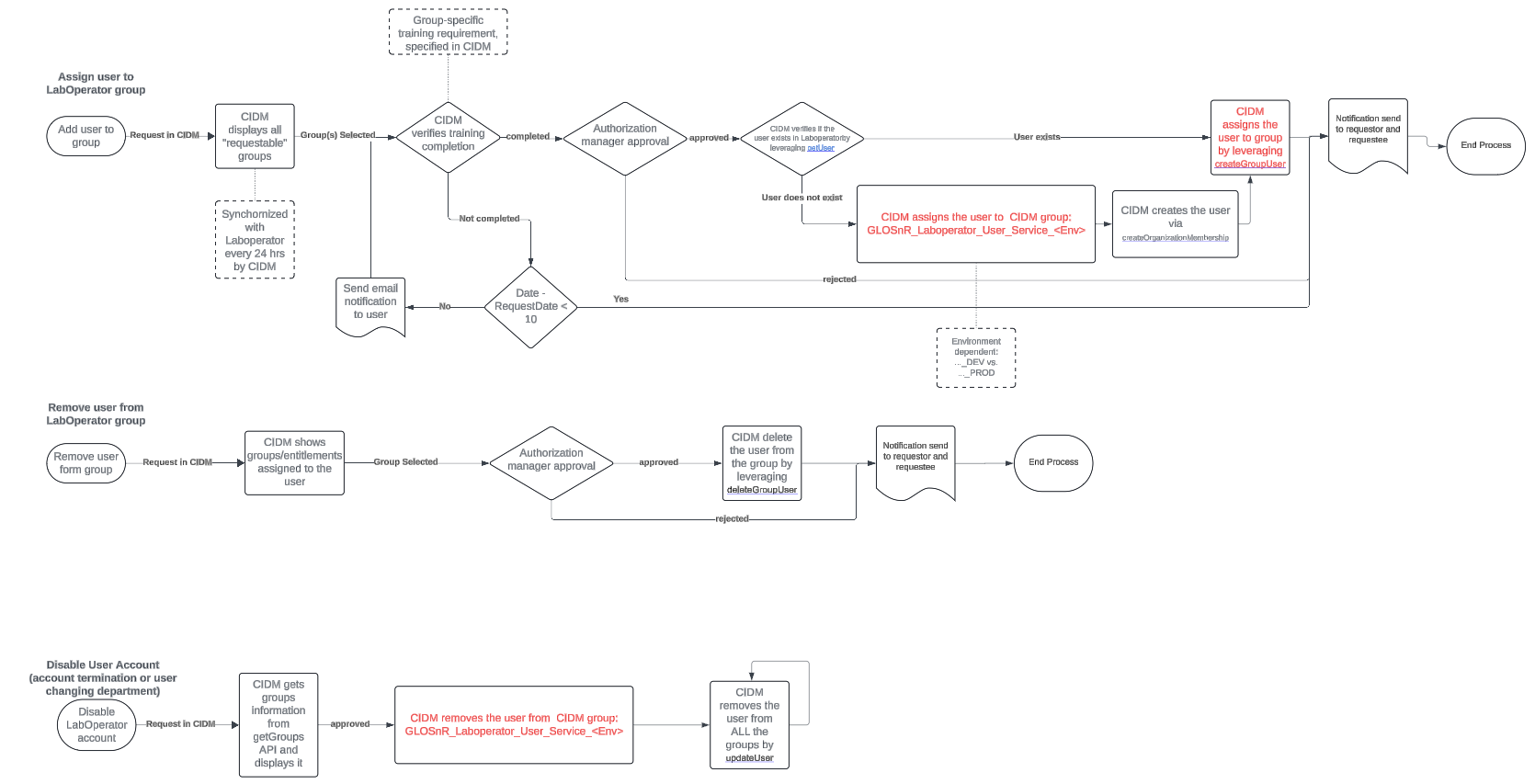
The CIDM team (contact von-schwerin.chahir@gene.com) offers custom application integrations. This is especially useful, when 3rd party applications need to be integrated which allow user and role management via APIs in order to prevent that user and role management either needs to be performed manually or is done by potentially expensive custom implementations of the external vendors.
The CIDM team can implement the integration with those APIs as part of the user on- and off-boarding processes as it is shown below for the example of Laboperator. Please note that authentication still should be implemented using Roche SSO (PingFederate).
Auto-filled AD/CIDM groups for access management
We have several AD groups which are all starting with GLOpAppAuth_ and which are using AD filters to be populated automatically. These groups reflect organisations and can be used for access management.
Name of AD group |
AD filter |
Description |
Sub groups |
GLOpAppAuth_pRED_All |
- |
- |
|
GLOpAppAuth_pRED_Internals_All |
|
All internal users
|
- |
GLOpAppAuth_pRED_Contractors_All |
|
All external users
|
- |
GLOpAppAuth_pRED_Trainees |
|
All internal users
|
- |
GLOpAppAuth_pRED_Technical |
- |
- |
- |
GLOpAppAuth_pRED_BDS |
- |
- |
|
GLOpAppAuth_CSCoE_All |
- |
- |
|
GLOpAppAuth_CSCoE_Internals_All |
- |
- |
|
GLOpAppAuth_CSCoE_Contractors_All |
- |
- |
|
GLOpAppAuth_CSCoE_EMEA_All |
- |
- |
|
GLOpAppAuth_CSCoE_EMEA_Internals_All |
|
All internal users
|
- |
GLOpAppAuth_CSCoE_EMEA_Contractors_All |
|
All external users
|
- |
GLOpAppAuth_CSCoE_NALA_All |
- |
- |
|
GLOpAppAuth_CSCoE_NALA_Internals_All |
|
All internal users
|
- |
GLOpAppAuth_CSCoE_NALA_Contractors_All |
|
All external users
|
- |
GLOpAppAuth_CSCoE_ASIA_All |
- |
- |
|
GLOpAppAuth_CSCoE_ASIA_Internals_All |
|
All internal users
|
- |
GLOpAppAuth_CSCoE_ASIA_Contractors_All |
|
All external users
|
- |
GLOpAppAuth_gRED_All |
- |
- |
|
GLOpAppAuth_gRED_Internals_All |
|
All internal users
|
- |
GLOpAppAuth_gRED_Contractors_All |
|
All external users
|
- |
GLOpAppAuth_CICoR_All |
- |
- |
|
GLOpAppAuth_CICoR_Internals_All |
|
All internal users
|
- |
GLOpAppAuth_CICoR_Contractors_All |
|
All external users
|
- |